Installation
Joystick Gremlin has one major dependency, vJoy which provides virtual joysticks which Joystick Gremlin feeds with data. Download links to the programs needed are listed below:
vJoy creates virtual joysticks which show up as a device in Windows and Joystick Gremlin uses these to forward inputs to them. Both Gremlin and vJoy require VC++ redistributables to be installed. This is likely already the case. In case of errors you can try to install VC++14 linked below which should take care of the issues related to this.
Using a vJoy variant other than the one linked here has the potential to be non-functional.
vJoy Configuration
In order to properly use Joystick Gremlin vJoy has to be configured first. This is done via the Configure vJoy program. This program allows setting the properties of all existing vJoy devices. Typically a single vJoy device is enough. In order to use 8-way POV hats with Joystick Gremlin the hats have to be configured as continuous in vJoy. The image below shows what a properly configured vJoy device looks like. Once everything is set as desired clicking Apply configures the vJoy device and the window can be closed.
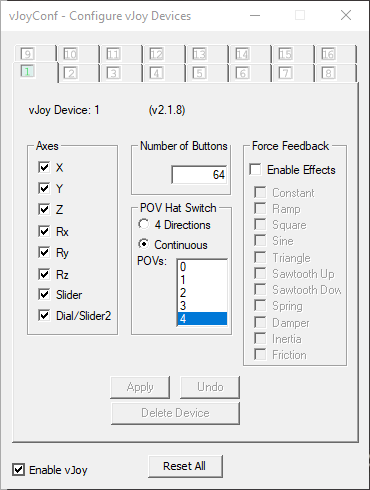
VJoy configuration dialog with settings required for proper Joystick Gremlin operation.
When configuring the hat instances make sure to select continuous for their type.
When configuring multiple vJoy devices, make sure they differ at least in one of the number of axes, buttons, or hats. If this is not the case Gremlin cannot correctly map from vJoy device identifiers to DirectInput device identifiers and will fail to start.